Simple code for HTML 5 Layout
HTML Layout Elements
HTML has several semantic elements that define the different parts of a web page:
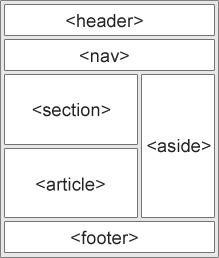
Simple Code for HTML 5 Layout Elements:
<!DOCTYPE html>
<html>
<head>
<title>HTML 5 Layout</title>
</head>
<style>
header{
background-color: brown;
margin:10px;
padding: 40px;
}
nav{
background-color: aqua;
margin:10px;
padding: 20px;
}
section{
background-color: blueviolet;
margin:10px;
padding: 40px;
}
article{
background-color: aquamarine;
margin:10px;
padding: 40px;
}
aside{
background-color: mediumseagreen;
margin:10px;
padding: 40px;
height: 125px;
}
footer{
background-color: brown;
margin:10px;
padding: 40px;
}
.div1 {
float: left;
width: 70%;
}
.div2 {
float: left;
width: 30%;
}
.div3 {
clear: both;
}
</style>
<body>
<header>Header</header>
<nav>Nav Menu</nav>
<div class="div1"><section>Section Part</section>
<article>Article Part</article>
</div>
<div class="div2">
<aside>Aside Part</aside>
</div>
<div class="div3">
<footer>Footer Part</footer>
</div>
</body>
</html>
Output:

Comments
Post a Comment